
AI tools have quietly changed how Roblox games get built. A few years ago, “AI-assisted game dev” for Roblox games mostly meant asking ChatGPT to spit out a Lua script and pasting it into Studio, hoping for the best – but this isn’t really how it works anymore.
Roblox now has an official way to let AI models see and edit your game directly inside Studio, and a growing number of solo developers are using it to build entire projects. Things like GUIs, spawn systems, admin tools, even full game loops can be developed now without knowing much Lua at all.
This guide walks through the actual methods people are using right now, in order of how effective they tend to be, plus the common mistakes that trip up beginners.
The Two Official Ways to Connect AI to Roblox Studio
1. Roblox’s Official MCP Server (The Method Most Devs Recommend)
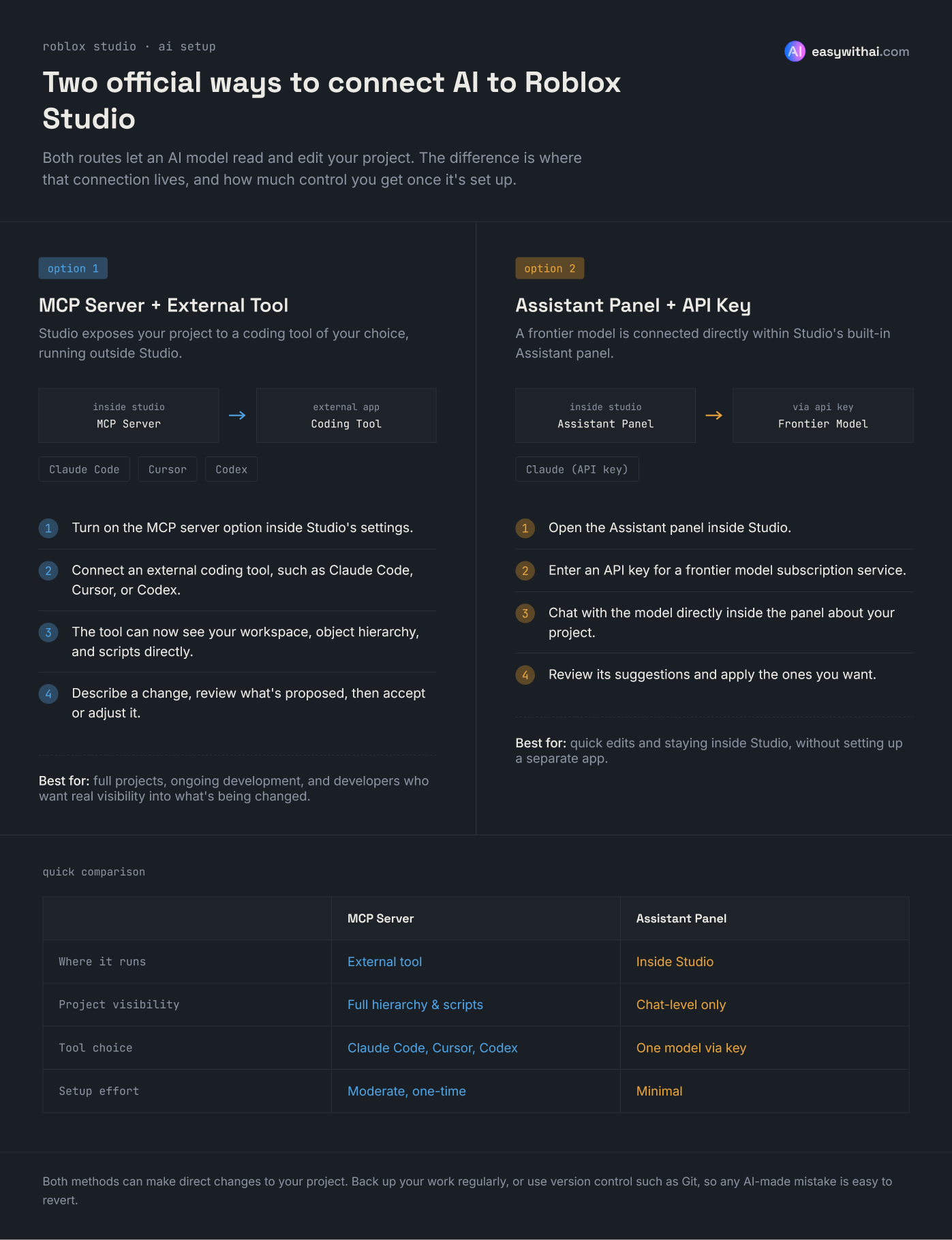
The single biggest shift in AI-assisted Roblox development has been the introduction of an official MCP server built directly into Studio. MCP stands for Model Context Protocol, and in simple terms, it’s a bridge that lets an AI coding tool actually see what’s inside your Studio project – the workspace, the object hierarchy, the scripts – and make changes to it directly, rather than you copying code back and forth manually.
This started as a beta plugin and has since been rolled into Studio as a toggleable option, and it’s become the go-to setup for developers who are serious about using AI as part of their workflow.
Here’s the basic idea of how it works:
- Enable the MCP server option inside Roblox Studio.
- Connect an external AI coding tool to that server – popular choices include Claude Code, Cursor, and OpenAI’s Codex.
- Once connected, the AI tool can read your scene, inspect your scripts, and make edits directly, rather than you manually pasting code snippets back and forth.
- You describe what you want changed or built, review what the AI proposes, and either accept the changes or ask it to adjust them how you see fit.
The advantage over just chatting with an AI in a browser tab is huge. The model isn’t guessing at your project structure anymore – it can actually see your objects, your script hierarchy, and how things are wired together, which means its suggestions are far more accurate and far less likely to break something unrelated (this can be super annoying and difficult to troubleshoot when it happens!)
If you’re going to use AI seriously for Roblox development, this is generally considered the strongest option available.
2. The Assistant Panel With a Frontier Model API Key
The second official route is Studio’s built-in Assistant panel. Tucked into the corner of the panel is a menu where you can plug in an API key from a frontier model provider (Claude being a common choice among developers). This gives you a similar experience to the MCP setup, but it’s more contained within Studio itself rather than using an external coding tool.
This works well too, but many developers who’ve tried both tend to prefer routing through a dedicated coding tool like Claude Code or Cursor via MCP, since those tools were built from the ground up for reading and editing codebases, not just chatting.
What About Standalone AI Game Builders?
There’s also a newer category of standalone tools built specifically to generate Roblox games from prompts – Lemonade and Promptblox are two names that come up fairly often. You describe your game idea, and the tool tries to generate assets, scripts, and systems for you in one go.
These can be a fun way to prototype an idea quickly, but it’s worth going in with realistic expectations:
- They’re generally less capable than working directly in Studio with an MCP-connected coding tool, since you have less visibility into and control over what’s actually being built.
- Many of them run on paid subscription tiers, and the pricing can add up quickly if you’re iterating a lot, which is exactly what building a game requires.
- Because you’re not working in your actual project files with a real coding assistant, it’s harder to build on top of what’s generated or fix things when they inevitably go wrong.
They’re not a bad starting point if you just want to see something come together fast. But if you’re planning to build something you’ll actually keep developing, connecting Studio to a proper coding tool through MCP is going to get you a lot further.
How to Actually Use AI to Build a Roblox Game (Without It Falling Apart)
Talking to developers who’ve spent months building games this way, a few patterns come up again and again.
Be Specific!
The single biggest mistake beginners make is asking for too much at once – something generic like “build me a full Roblox game.” AI models tend to fail badly on requests that vague, and this applies across almost all AI applications – not just game dev. The developers who get good results ask for one specific, well-defined thing at a time: a script that moves a platform back and forth, a GUI for a countdown timer, a spawn system tied to a specific rank.
Treat It Like Working With a Junior Developer
A workflow that comes up a lot among experienced AI-assisted devs looks something like this:
- Explain exactly what you want the feature to do and how it should behave.
- Tell the AI which scripts or objects it should be working with.
- Ask it to confirm its understanding before making changes, and whether there’s a simpler approach given what already exists in your project.
- Review the proposed changes before accepting them.
- Repeat, piece by piece, until the feature (and eventually the full game) is done.
Expect Debugging – It’s Part of the Process
AI-generated code doesn’t always work on the first try, and that’s normal! It’s a lot like working with a human collaborator: sometimes you need to point out what’s broken and ask for a fix, sometimes it takes a few rounds back and forth. The developers who succeed with this approach are the ones willing to say “that didn’t work, here’s what happened, try again” rather than giving up after the first failed attempt.
Back Up Your Work
This one matters more than people expect going in. Regular backups aren’t optional when you’re letting an AI make direct changes to your project. Studio has added more built-in versioning over time, but it’s still worth learning a proper version control system like Git so you can revert mistakes cleanly. Undo (Ctrl+Z) helps in a pinch, but it’s really not a substitute for a proper version history.
Why You Should Still Learn to Code Alongside AI
It’s genuinely possible to build a working Roblox game today with very little Lua knowledge, using AI to handle most of the scripting. Plenty of people are doing exactly that. But there’s a real case for learning at least the fundamentals of Lua (specifically Roblox’s version of Lua which is Luau) and Roblox’s systems as you go, rather than treating AI as a total replacement for understanding your own project.
A few reasons this matters:
- You’ll debug faster. When something breaks, even a basic understanding of what the code is doing lets you describe the problem accurately instead of guessing.
- You’ll make better decisions about what to ask for. Knowing roughly how systems like data stores, GUIs, or events work helps you request the right thing in the first place.
- AI won’t always be available or free. Rate limits, subscription costs, or just wanting to work offline are all real scenarios where basic coding knowledge pays off. This doesn’t apply to local models of course, but local coding models that are actually usable in game dev are pretty much non-existent at this point in time.
- It’s a transferable skill. Understanding programming concepts carries over to other engines, languages, and projects in a way that “knowing how to prompt an AI” alone doesn’t.
If you do end up building an entire game largely through AI, treat it as a learning opportunity rather than a shortcut to avoid. Read the code it generates. Ask it to explain what a script is doing and why. Try tweaking small things yourself before asking the AI to do it! If you use proper version history and backups, it doesn’t matter if you mess up or accidentally break a function. The goal isn’t just to finish one game – it’s to come out the other side with skills you can carry into the next project, with or without AI in the loop.
Getting Started: A Simple Path
If you’re new to this and not sure where to begin, here’s a reasonable order to try things in:
- Install Roblox Studio and enable the official MCP server in settings.
- Connect it to a coding tool you’re comfortable with – Claude Code and Cursor are both solid, beginner-friendly starting points.
- Pick a small, specific first feature to build (not a whole game) and practice the describe-review-accept workflow.
- Set up basic version control or at least regular manual backups before you start letting AI touch your scripts.
- As you go, read the code being generated and look up anything you don’t understand.
Roblox game development with AI isn’t magic, and it’s definitely not instant. But for developers willing to work iteratively, back up their progress, and stay curious about what the code is actually doing, it’s a seriously powerful way to build – and learn – at the same time. On the plus side, AI models are only getting better and more useful for projects like these, so it should genuinely get easier going into the future and as Roblox adopts more official AI-assisted tools into Studio.

