
If you’d told someone in 2023 that by 2026 you’d be running near-frontier image models on a single RTX 4090 in your bedroom, they’d probably have laughed. But here we are! The gap between “closed API you pay per image for” and “open weights you download once and run forever” has basically collapsed, and honestly, it’s one of the more exciting shifts in the whole AI space right now (especially for those who value open-source tools.)
The tricky part is that there are now so many open-weight image models floating around that picking one feels like standing in the cereal aisle having a small existential crisis. Some are built for raw photorealism, some are obsessed with getting text inside images to actually look right, and some exist purely because someone wanted the fastest possible generation on a laptop GPU. So we went through the current crop and pulled together the ones that genuinely earn a spot on your hard drive.

A quick note before we get into it: “local” here means you can self-host the weights on your own hardware, not that every model is lightweight. A couple of these will absolutely want a beefy GPU, so keep an eye on the VRAM numbers as you read.
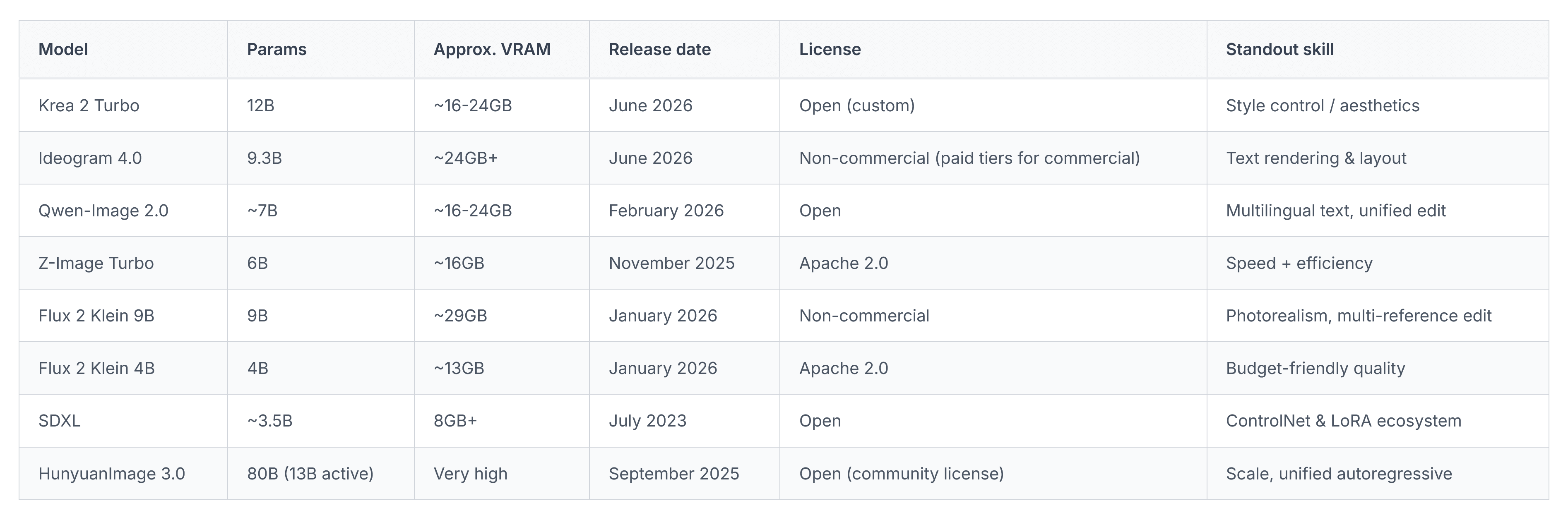
For those looking for a quick and to the point list of the best models right now, we’ll drop a full list of the ones we’ve included on this page just below. We’ve also included a comparison table towards the bottom of this article if you’d prefer to take a quick glance at the differences between each model.
- Krea 2
- Ideogram 4.0
- Qwen-Image
- Z-Image Turbo
- Flux 2
- SDXL
- HunyuanImage 3.0
1. Krea 2 (and Krea 2 Turbo) – the aesthetics-obsessed one
Krea built its reputation as a slick front-end for other people’s models, so it was a bit of a surprise when the team dropped Krea 2 in June 2026 – their first fully from-scratch foundation model. It’s a 12-billion-parameter Diffusion Transformer, and instead of chasing the usual “maximum photorealism” race, Krea 2 leans hard into style control. Think moodboards, style sliders you can push and pull, and the ability to blend multiple reference aesthetics into one coherent image.
There are two open checkpoints here worth knowing about: Krea 2 Raw, which is the undistilled base model meant for fine-tuning and LoRA training, and Krea 2 Turbo, an 8-step distilled version that can spit out a 2K image in around two seconds on consumer hardware. The recommended workflow is actually pretty clever – train your LoRAs on Raw, then run them through Turbo for fast, polished output. Krea also made a point of training exclusively on real photography rather than synthetic data, which they argue keeps the output diversity higher (and honestly, you can kind of tell in the results – it doesn’t have that slightly “sameish” AI look a lot of models fall into).
Best for: creators who want a distinct visual identity rather than the default AI aesthetic, and anyone doing brand or moodboard-driven work.
2. Ideogram 4.0 – finally, text that doesn’t look like alphabet soup
Ideogram has been the go-to name for in-image text since basically forever, and version 4.0 (released June 2026) is the first time they’ve opened up the weights. That’s a genuinely big deal – it’s a 9.3-billion-parameter model paired with a Qwen3-VL text encoder, and it hits a 0.97 score on the X-Omni English OCR benchmark, which is about as close to real typography as these models get right now.
What makes it stand out beyond typography is the structured JSON prompting system. Rather than hoping the model interprets your text prompt correctly, you can define bounding boxes, hex color palettes, and layout elements directly, and the model builds the image around that structure. For anyone doing packaging mockups, posters, or UI concepts, this genuinely changes the workflow. One thing to point out though: the open weights come under a non-commercial license, so if you’re planning to sell what you make, you’ll want to check the licensing tiers before you get too attached to it.
Best for: designers, marketers, and anyone who needs legible, well-placed text baked directly into the image rather than added in Photoshop afterward.
3. Qwen-Image (and the new Qwen-Image 2.0)
Alibaba’s Qwen-Image has quietly become one of the most respected open models for anyone working across English and Chinese, or really any language where text rendering tends to fall apart in most diffusion models. The original release was a 20-billion-parameter MMDiT model built on a Qwen2.5-VL backbone, and it topped multiple public benchmarks including GenEval and DPG for text-to-image accuracy.
Then in February 2026, Alibaba pushed out Qwen-Image 2.0, which is arguably the more interesting release. It folds generation and editing into a single unified model and actually shrinks the parameter count down to around 7 billion while keeping the quality high. That’s a nice change of direction – most labs are scaling up, Alibaba scaled down and kept the performance. It handles native 2048×2048 output, takes prompt inputs up to roughly 1,000 tokens, and can do reference-based multi-image editing where you feed it two or three source images and it merges elements from each.
Best for: multilingual text rendering, infographics, posters, and anyone who wants generation and editing without juggling two separate models.
4. Z-Image Turbo – ridiculously fast, ridiculously small
This one genuinely surprised people. Z-Image Turbo comes from Alibaba’s Tongyi-MAI team (a separate group from the main Qwen team, worth noting) and packs impressive realism into just 6 billion parameters. It runs comfortably in 16GB of VRAM and generates images in under a second on decent hardware – on datacenter GPUs it’s sub-second, and even on a mid-range consumer card you’re only looking at a couple of seconds per image.
The architecture uses something called S3-DiT (Scalable Single-Stream Diffusion Transformer), which merges text and image tokens into one stream instead of processing them separately, and that’s a big part of why it’s so efficient at this size. It also does native bilingual Chinese/English text rendering, which is still a weak spot for a lot of Western-trained models. At the time of writing it’s sitting at the top of the Artificial Analysis leaderboard among open-weight models, ahead of some models several times its size. For anyone on a budget GPU or laptop who still wants genuinely good output, this is probably the single best value model on this whole list.
Best for: speed, low VRAM setups, and rapid iteration or prototyping where you’re generating dozens of variations quickly.
5. Flux 2 Dev (and Klein 9B) – still the quality benchmark, now in a smaller size too
Black Forest Labs’ Flux line has been the “quality leader” of the open-weight world for a while now, and Flux 2 Dev keeps that reputation, though it’s not exactly a lightweight – it’s a 32-billion-parameter flow matching transformer, and running the full version comfortably wants something in the H100 class. The good news is BFL partnered with Hugging Face on quantized versions that’ll run on a single RTX 4090 with a remote text encoder, so it’s not totally out of reach for enthusiasts.
If your hardware isn’t quite there, though, the Klein family (released January 2026) is where things get interesting. Klein comes in 4B and 9B sizes, both step-distilled down to just 4 sampling steps for sub-second inference, and both handle text-to-image, single-image editing, and multi-reference generation in one architecture. The 9B version pairs the flow model with an 8B Qwen3 text embedder for genuinely strong prompt comprehension, and needs around 29GB of VRAM – so an RTX 4090 or better. The 4B version is the one to grab if you’re commercial-use focused, since it’s released under Apache 2.0, while the 9B carries the FLUX Non-Commercial License.
Best for: photorealism, hands and anatomy accuracy (long a weak point for diffusion models generally), and multi-reference editing workflows.
6. SDXL – old, but nowhere near done
SDXL is from 2023, which in AI years is basically ancient history. But it earns its spot here for one specific reason: nothing else comes close to its ControlNet ecosystem. When you need precise, structural control over a generation – locking in a pose, following a depth map, matching an exact edge outline – SDXL’s ControlNet library is still the deepest and most reliable one out there. OpenPose, Canny, depth, lineart, tile, segmentation… the list goes on, and most of these checkpoints have had years of community refinement behind them.
It also fits in as little as 8GB of VRAM, which is a fraction of what newer models need – even less than Z-Image Turbo, and the LoRA and custom checkpoint ecosystem (RealVisXL, JuggernautXL, DreamShaperXL, and thousands more) is genuinely unmatched anywhere else. Newer models are catching up on ControlNet support, but as of right now, if a project genuinely depends on tight structural control rather than just “make something that looks nice,” SDXL is still the practical choice for a lot of working artists and studios.
Best for: pose-locked or structure-locked generation, inpainting/outpainting workflows, and anyone running on limited VRAM who still wants a mature, battle-tested pipeline.
Bonus: HunyuanImage 3.0 – the biggest open model you can actually run
Tencent’s HunyuanImage 3.0 deserves a mention, because it’s genuinely a different kind of release. It’s an 80-billion-parameter Mixture-of-Experts model (with about 13B active per token), making it the largest open-source image generation model out there right now. Instead of a typical diffusion architecture, it uses a unified autoregressive framework that handles generation, editing, and image understanding all in one model – no swapping pipelines depending on the task.
It’s a heavier lift to self-host given the total parameter count, but Tencent has released distilled checkpoints for more efficient deployment, and it’s worth keeping on your radar even if you don’t run it day to day. It’s a good signal of where the field is heading: models built on language-model-style backbones rather than bolted-on text encoders.
Comparison Table
So which one should you actually download?
Honestly, it depends on what you’re doing more than anything else. If you’ve got a modest GPU and just want fast, good-looking images without fuss, grab Z-Image Turbo – it punches way above its weight. If you’re doing design work with text, packaging, or posters, Ideogram 4.0 or Qwen-Image 2.0 will save you a ton of manual cleanup. If you want a distinct visual style rather than the “default AI look,” Krea 2 is worth the download. And if your work genuinely depends on locking down poses or compositions with pixel-level precision, don’t sleep on SDXL just because it’s a few years old now – the ControlNet ecosystem alone still makes it indispensable for a lot of workflows.
The nice thing about where we’re at with open-source and local models is that you don’t really have to pick just one. Most of these run happily side by side in ComfyUI, and swapping between them for different jobs is pretty painless these days. Have fun experimenting and we hope you’ll find a model that is perfect for your needs!

